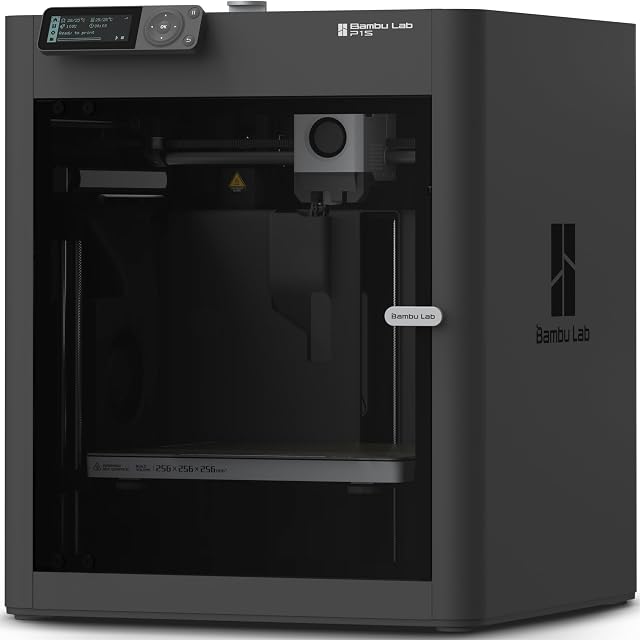
Bambu Lab P1S 3D Printer (Without AMS), Enclosed CoreXY FDM Printer with 256 x 256 x 256 mm Build Volume
Reviewed by RateThePick Editorial Team · Updated
The Bambu Lab P1S is an enclosed FDM 3D printer, meaning it builds objects layer by layer from melted 1.75 mm plastic filament, with a CoreXY motion system designed for fast printing. This version is the standalone printer without the AMS multicolor filament unit. It pairs a 256 x 256 x 256 mm nominal build volume, automatic bed leveling and an all-metal hotend rated to 300°C with Bambu Lab's connected ecosystem of Bambu Studio, the Bambu Handy app and the MakerWorld model library. Reviewers have placed it in the mid-range, aimed at people who want reliable everyday prints without a lot of hands-on tuning.
- Enclosed CoreXY design built for fast printing, with Bambu Lab rating movement at up to 500 mm/s and 20,000 mm/s² acceleration
- Automatic bed leveling and default profiles that independent reviewers found worked consistently
- Enclosure, extra fans and activated carbon filter help with temperature-sensitive materials like ABS and ASA
As an Amazon Associate we earn from qualifying purchases.
Best For
Hobbyists, students, makers and first-time 3D printer owners who want a fast, enclosed printer that works well out of the box, prints common materials like PLA, PETG and TPU, and can also handle temperature-sensitive materials like ABS and ASA thanks to its enclosure. It also suits buyers who want to start with single-color printing and keep the option of adding an AMS unit later.
Things to Consider
- Multicolor printing requires a separately purchased AMS unit
- Fans and fast movement can be noticeably loud, and a sturdy table helps limit vibration
Score Breakdown
Why We Like It
What Buyers Notice
In the public owner discussions we looked at, a common theme was how little tuning the P1S needs compared with older printers, with several owners describing dependable everyday prints, particularly people upgrading from earlier budget machines. Beginner discussions were broadly encouraging, while noting that custom slicer settings and material handling still take some learning. Some owners who later added an AMS said they wished they had done so sooner, while others said they rarely needed it. Fan noise and vibration came up in owner threads, with one reply reporting improvement after running noise calibration.
Who Should Buy It
Buy the Bambu Lab P1S (Without AMS) if you want an enclosed, fast 3D printer that works well with minimal tuning, prints everyday materials reliably and can step up to ABS and ASA. It is a smart pick for beginners and upgraders who mainly print in one color or want to add multicolor capability later. If you know you want multicolor printing from day one, consider the P1S Combo instead.
Detailed Review
The Bambu Lab P1S is an enclosed FDM 3D printer that aims to make fast, high-quality printing accessible without constant adjustment. This listing is the standalone printer without the AMS (Automatic Material System) filament unit.
Design and hardware
The P1S uses a CoreXY layout, where belts move the print head horizontally while the bed moves up and down. It has a steel chassis with a plastic and glass shell, a direct-drive extruder, an all-metal hotend with steel gears and a stainless-steel nozzle. A 0.4 mm nozzle is included, with 0.2, 0.6 and 0.8 mm nozzles available as options. Bambu Lab rates the hotend to 300°C and the bed to 100°C, and a double-sided textured PEI plate comes with the printer.
The nominal build volume is 256 x 256 x 256 mm. Bambu Studio limits height to 250 mm by default, and the brand provides instructions for unlocking the remaining 6 mm. The printer itself measures 389 x 389 x 458 mm and weighs 12.95 kg, according to Bambu Lab.
Speed and print quality
Bambu Lab advertises up to 500 mm/s movement, 20,000 mm/s² acceleration and a 32 mm³/s flow rate, supported by vibration compensation and pressure advance. The brand also cites roughly 15-minute setup and an 18-minute Benchy test print. In Tom's Hardware's testing, a speed boat printed in 18 minutes at 500 mm/s versus 26 minutes at normal settings, with similar visible quality. WIRED's home test also reported a Benchy in under 20 minutes. Real jobs will vary, since actual speeds depend on walls, infill, model and settings.
Materials and the enclosure
Bambu Lab lists PLA, PETG, TPU, ABS, ASA, PVA and PET as preferred materials, with PA and PC described as capable. The enclosure, a chamber fan, an auxiliary part-cooling fan and an activated carbon filter help maintain printing conditions for temperature-sensitive materials. Tom's Hardware printed ASA smoothly without warping, while All3DP found small ASA models with brims held well and wider bases were more prone to lifting. Carbon- and glass-filled filaments are not recommended on stock hardware.
Software and ecosystem
- Bambu Studio (Windows and macOS) handles detailed slicing, meaning converting 3D models into printer instructions.
- Bambu Handy offers phone access and simple model-to-printer printing.
- MakerWorld combines models with community print profiles, so supported models can be prepared and sent with few steps.
Bambu Lab also describes local LAN operation through Bambu Connect that can work without internet or an account. Connectivity includes Wi-Fi, Bluetooth and microSD storage.
Monitoring and convenience features
A built-in 720p camera captures one frame every two seconds, which is suited to quick check-ins and time-lapses rather than smooth live video. A filament runout sensor, cutter and power-loss recovery add peace of mind on longer prints.
Multicolor upgrade path
This package prints one filament at a time. Adding an AMS unit enables four-filament selection, expandable up to 16, and Bambu Lab also lists P1 compatibility for the newer AMS 2 Pro with the appropriate upgrade kit. Color changes with one nozzle involve purging, which adds time and some waste.
Bottom line
The P1S delivers a strong mix of speed, consistency and material flexibility, wrapped in an ecosystem that makes getting started straightforward. For buyers who want an enclosed, dependable printer and are happy to start with single-color printing, it is a well-rounded choice.
FAQ
Can the Bambu Lab P1S print in multiple colors?
Not on its own in this package. Automatic multicolor printing requires a separately purchased AMS unit. One AMS provides four filament slots, and Bambu Lab says expansion supports up to 16.
Is the P1S good for beginners?
Owner discussions are broadly encouraging for beginners, especially when starting with prepared MakerWorld models and profiles. Learning custom slicer settings and different materials still takes some time.
Do I have to use Bambu Lab filament?
No. Bambu Lab has stated it does not prohibit third-party filament. You will still need compatible material and suitable print settings.
Does the P1S always print at 500 mm/s?
No. 500 mm/s is Bambu Lab's advertised maximum movement speed. Actual print times depend on the model, walls, infill and other settings.
Does the P1S need an internet connection to print?
Bambu Lab describes local LAN operation through Bambu Connect that can work without internet or an account. Exact setup depends on your firmware and software versions.
Can it print carbon fiber or glass-filled filament?
Not as supplied. Bambu Lab says the extruder and hotend need to be upgraded before printing fiber-filled filaments.