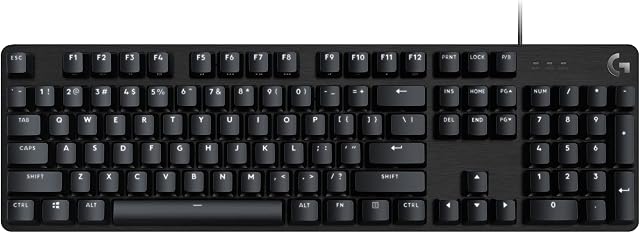
Logitech G413 SE Full-Size Mechanical Gaming Keyboard with Tactile Switches, PBT Keycaps, Aluminum Top and White Backlighting - Black
Reviewed by RateThePick Editorial Team · Updated
The Logitech G413 SE is a full-size wired mechanical gaming keyboard with a number pad, tactile mechanical switches, PBT keycaps, a brushed aluminum top plate and white per-key backlighting. It skips software, RGB and extra buttons in favor of a simple plug-in-and-play design, positioning it as an entry-level mechanical keyboard for people who want a solid, no-fuss setup for gaming and everyday typing on Windows or Mac.
- Brushed 5052 aluminum top plate gives the board a rigid, premium feel
- PBT keycaps, which Logitech describes as resistant to heat and wear
- Full-size layout with a number pad, plus 12 Fn shortcuts for media and lighting
As an Amazon Associate we earn from qualifying purchases.
Best For
Gamers and home or office users who want a sturdy full-size mechanical keyboard with a number pad, prefer clean white lighting over RGB, and would rather control everything with keyboard shortcuts than install an app.
Things to Consider
- No Logitech G HUB support, so there are no software macros, key remapping or RGB
- Firm tactile switches take some adjustment, and several reviewers described them as on the louder side
Score Breakdown
Why We Like It
What Buyers Notice
Feedback from verified retail buyers of this exact model leans positive. Build quality is the most frequently mentioned topic, with owners describing a solid feel and satisfying typing experience. The clean white illumination and simple setup also come up as recurring positives. A couple of owners noted that the key legends are harder to read with the backlight off and that the keys were a bit louder than they expected, so it is worth keeping the lighting on in dim rooms and considering your environment if you share a space.
Who Should Buy It
Buy the Logitech G413 SE if you want a durable, full-size mechanical keyboard with a number pad, a clean look and simple onboard controls that work without software. It suits gamers and typists who value build quality over customization. If RGB lighting, macros or a wrist rest are must-haves, a more feature-rich keyboard will serve you better.
Detailed Review
The Logitech G413 SE is a stripped-back take on a mechanical gaming keyboard. Instead of RGB lighting and companion software, it focuses on a sturdy frame, durable keycaps and tactile switches, with every adjustment handled directly on the keyboard.
Design and build
The upper case is black brushed 5052 aluminum, which Logitech promotes as aircraft-quality and designed to resist flex, sitting on a plastic base. The full-size keyboard measures about 17.13 x 5 x 1.43 inches and weighs roughly 1.72 lb, with a fixed 1.8 m rubber cable ending in a USB Type-A plug. Independent reviewers from RTINGS, GamesRadar+ and others highlighted the rigid case. One reviewer noted the metal top can show fingerprints, which is typical of brushed aluminum finishes.
Switches and typing feel
The switches are tactile mechanical, meaning you feel a small bump at the point a keypress registers. Several independent reviewers identify them as Long Hua Brown switches, though Logitech itself simply calls them tactile. Listed specifications put actuation force at 50 g, actuation distance at 1.9 mm and total travel at 4 mm. Impressions of feel and sound vary: some reviewers found them stiff or loud at first, while Ars Technica found them enjoyable after an adjustment period and Tom's Hardware did not find them fatiguing once used to them. RTINGS described typing as quiet. In other words, expect a firm, tactile keyboard and give it a few days.
Keycaps and lighting
The keycaps are PBT, a plastic Logitech describes as highly durable and resistant to heat and wear, and reviewers liked their texture. Each key has a white LED. According to the official setup guide, there are five onboard lighting patterns (static, serpent, reactive, random and breathing), selectable with Fn+F12, along with brightness and pattern-speed controls.
Gaming performance
Logitech rates the G413 SE for six-key rollover with anti-ghosting, which means it is designed to register up to six simultaneous key presses correctly. In hands-on testing across titles such as Doom Eternal, Final Fantasy XIV, Apex Legends and Sifu, reviewers reported that the keyboard kept up with their inputs. A Fn+Windows shortcut disables the Windows key so it cannot pull you out of a game.
Features and compatibility
- Wired USB connection; Logitech lists Windows 10 or later and macOS 10.14 or later
- Volume, mute, playback and track controls on the function row via Fn
- No G HUB support, macro keys, USB passthrough or wrist rest
- Switches are not hot-swappable
Verdict
The G413 SE is a focused keyboard: solid materials, dependable inputs and simple onboard controls, without the extras found on pricier gaming boards. Reviewers differed on whether that balance is worth it, with MMORPG.com more positive and some outlets wishing for more features. For buyers who want a well-built, full-size mechanical keyboard that works the moment it is plugged in, it is an easy recommendation in the budget tier.
FAQ
Is the Logitech G413 SE wireless?
No. It is a wired keyboard that connects with a fixed USB Type-A cable about 1.8 m long.
Does the full-size G413 SE have a number pad?
Yes. This full-size version includes a numeric keypad. A separate, more compact TKL version without the number pad is also sold.
Can I change the lighting without installing software?
Yes. The white backlighting has five onboard effects plus brightness and speed controls, all adjusted with Fn shortcuts. The keyboard does not support Logitech G HUB and the lighting is white only, not RGB.
Can I disable the Windows key while gaming?
Yes. Logitech documents Fn+Windows as the shortcut to turn the Windows key off and back on.
Does it work with a Mac?
Logitech lists macOS 10.14 or later as supported, and reviewers used it on a MacBook Pro without any setup. RTINGS noted that the Scroll Lock and Pause/Break keys did not function on Mac.
What warranty does it come with?
A Logitech representative and a US retailer listing both state a two-year limited hardware warranty, though some listings show one year. Check the warranty terms with your seller at purchase.