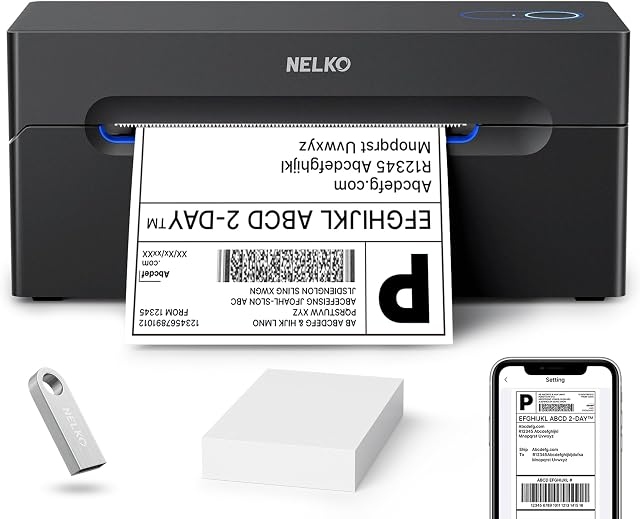
Nelko PL70e-BT Bluetooth Thermal Shipping Label Printer, 4x6 Inkless Label Printer with USB, 203 DPI, for iPhone, Android, Windows and Mac
Reviewed by RateThePick Editorial Team · Updated
The Nelko PL70e-BT is a compact direct thermal label printer for 4x6 shipping labels and other barcode or product labels. Direct thermal means it prints with heat onto special heat-sensitive labels, so there is no ink, toner, or ribbon to buy. It connects over Bluetooth to phones and over USB (or driver-based Bluetooth) to computers, and it sits at the budget end of the shipping label printer market, aimed at home sellers and small businesses that want to stop printing labels on a regular office printer.
- Inkless direct thermal printing, so labels are the only ongoing supply
- Works with compatible generic direct thermal labels in rolls or fanfold stacks from 40 to 104 mm wide
- Bluetooth app printing from iPhone and Android plus USB for Windows and Mac
As an Amazon Associate we earn from qualifying purchases.
Best For
Home sellers, side-hustle shippers, and small online shops on platforms such as eBay, Etsy, Shopify, or Amazon who print 4x6 shipping labels from PDF files and want an affordable, inkless printer that can work from a phone or a computer.
Things to Consider
- No Wi-Fi or AirPrint; wireless printing goes through Bluetooth and Nelko's app
- Label size and alignment settings may need some fine-tuning when you first set it up or change label stock
Score Breakdown
Why We Like It
What Buyers Notice
Public owner feedback is generally favorable, and the printer carries a solid overall rating from thousands of buyers. One long-term owner reported it still printing mailing labels reliably more than a year after purchase, and another described a smooth eBay PDF import with automatic cropping followed by trouble-free use across a couple of months of shipments. The most common practical topic in owner discussions is getting label size and alignment right; some owners reported much better results after cropping the PDF, matching the label dimensions, adjusting density, or running the printer's calibration.
Who Should Buy It
Buy the Nelko PL70e-BT if you ship regularly from home or a small business, print labels from PDF files, and want an affordable inkless printer that works from both your phone and your computer. Use USB when printing larger batches for the fastest results. If wireless printing through Wi-Fi or AirPrint is a must, consider a Wi-Fi model instead.
Detailed Review
The Nelko PL70e-BT is a budget-friendly 4x6 shipping label printer built for people who ship from home or run a small online shop. It uses direct thermal printing, which means a heated printhead darkens special heat-sensitive labels. There is no ink, toner, or ribbon, but you do need direct thermal labels; ordinary paper or standard sticker labels will not work.
Print quality and speed
Nelko lists a resolution of 203 dpi, the common standard for shipping labels, and rates the maximum print speed at 150 mm per second (about 6 inches per second). The brand's throughput claims vary between sources, from over 60 to 72 labels per minute, so treat those as Nelko's figures. In independent hands-on testing over USB, 25 labels printed in about 30 seconds, or roughly 1.2 seconds each after a short startup. A single label over Bluetooth took about 5.3 seconds including transfer time. The same reviewer found the output readable and scannable, noting slowdowns on heavily dark areas.
Labels and paper handling
- Accepts labels from 40 to 104 mm wide (about 1.57 to 4.1 inches), with 4x6 as the typical shipping size.
- Works with compatible generic direct thermal rolls or fanfold stacks; Nelko-branded labels are not required.
- Labels feed from the rear with adjustable guides and automatic intake, and you tear labels off by hand.
- Because labels feed from outside the printer, plan desk space for the label stack or a holder. A holder is included only with certain package options.
Phone printing
Nelko's official tutorial uses the Shipping Printer Pro app on iOS and Android (some Nelko materials refer to the NELKO app instead). You connect to the printer inside the app, import the shipping label PDF from your selling platform or carrier, enter the label width and height, and adjust density or speed if needed. Nelko recommends keeping the phone within about five meters. Marketplace compatibility with Amazon, eBay, Shopify, Etsy, USPS, UPS and PayPal means printing a properly formatted label file rather than a direct automatic integration.
Computer printing
On Windows and Mac you install the included driver, and Nelko recommends USB for the best speed and stability. Windows can also print over Bluetooth through the driver. According to the manual, Macs print over USB, with Bluetooth app printing listed for M1 and M2 Macs. The product page also lists Linux and ChromeOS support. The printer works with one device at a time.
Setup tips
- Use the original label PDF rather than a screenshot, and crop letter-size PDFs to the actual label area.
- Match the label size in your file, driver, or app to the labels loaded in the printer.
- After changing label stock, hold the FEED button until it beeps once (about three seconds) to calibrate.
Warranty
Nelko states a 12-month limited hardware warranty from the original purchase with proof of purchase, plus a possible six-month extension if an eligible product bought through an authorized channel is registered within 30 days.
Verdict
For sellers who mainly need dependable, inkless 4x6 shipping labels from a phone or computer, the PL70e-BT delivers the core features at a budget price. Take a few minutes to set label size and calibrate, and it should settle into a straightforward part of your packing routine.
FAQ
Does the Nelko PL70e-BT need ink?
No. It is a direct thermal printer that uses heat-sensitive labels, so there is no ink, toner, or ribbon. You do need compatible direct thermal labels.
Can I print from my iPhone or Android phone?
Yes. Nelko's official tutorial uses the Shipping Printer Pro app over Bluetooth. You import the label PDF, set the label width and height, and print.
Do I have to buy Nelko-brand labels?
No. It works with compatible direct thermal labels in rolls or fanfold stacks between 40 and 104 mm wide, including standard 4x6 shipping labels.
Does it have Wi-Fi?
No. It connects through Bluetooth and USB. For computers, Nelko recommends USB for the best speed and stability.
What should I do if labels print off-center or blank labels feed out?
Make sure the label size in your file and settings matches the loaded labels, then calibrate by holding the FEED button until it beeps once, about three seconds.
What warranty does Nelko offer?
Nelko states a 12-month limited hardware warranty with proof of purchase, plus a possible six-month extension if an eligible product from an authorized channel is registered within 30 days.