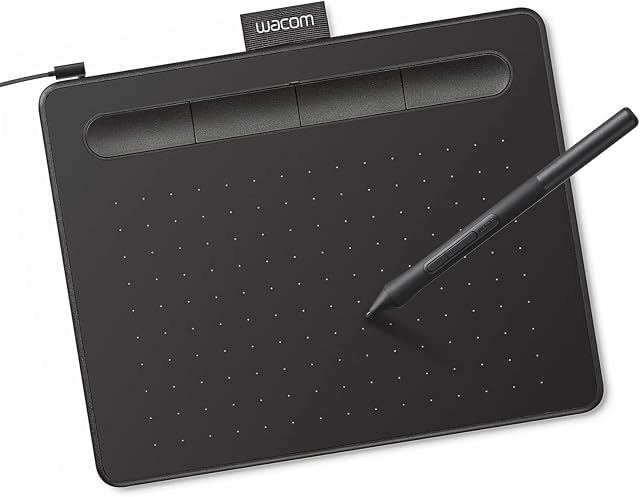
Wacom Intuos Small Wired Graphic Drawing Tablet (CTL4100) with Battery-Free Pen and 4 ExpressKeys
Reviewed by RateThePick Editorial Team · Updated
The Wacom Intuos Small (CTL4100) is a compact, wired pen tablet that lets you draw, sketch, edit photos or write by hand on your computer. It has no screen of its own: you move the included battery-free pen across the tablet and watch your work on your monitor. With 4,096 pressure levels, four customizable ExpressKeys and a 6.0 x 3.7 in active area, it sits in the entry-level part of Wacom's lineup and is aimed at students, teachers, hobbyists and anyone starting out in digital art.
- Battery-free pen never needs charging or replacement batteries
- 4,096 pressure levels for natural line weight and opacity control in compatible apps
- Four ExpressKeys plus two pen buttons for customizable shortcuts on Windows and Mac
As an Amazon Associate we earn from qualifying purchases.
Best For
Beginners in digital drawing, students and teachers who want handwriting or annotation on a computer, photo editors who want finer brush control than a mouse, and anyone working at a small desk who wants a lightweight tablet that sits comfortably next to a keyboard.
Things to Consider
- The small 6.0 x 3.7 in active area can feel tight for broad strokes or very large monitors
- The pen has no tilt sensing or flip-to-erase end
Score Breakdown
Why We Like It
What Buyers Notice
Public buyer feedback for the Intuos Small is largely positive, with a strong average rating across a large number of reviews. Common themes in summarized feedback include easy everyday use, solid performance for basic drawing and handwriting, and a compact size that suits limited desk space. Buyers also point to the software offers, precision and overall value as positives. Some owners discuss whether the small drawing area suits their style, and nib wear experiences vary, with one owner describing a single nib lasting several months of daily use.
Who Should Buy It
Buy the Wacom Intuos Small CTL4100 if you want an affordable, reliable first pen tablet for drawing, photo editing, note-taking or online teaching on a Windows PC, Mac or compatible Chromebook, and you value a pen that never needs charging. If you need a bigger drawing area, tilt support or a wireless connection, look at a Medium, Bluetooth or higher-tier model instead.
Detailed Review
The Wacom Intuos Small (CTL4100) is the wired version of Wacom's entry-level Intuos pen tablet. It is a screenless tablet, which means you draw on the tablet surface while looking at your computer monitor. It needs a computer, compatible Chromebook or compatible Android device to work.
Design and size
The tablet measures about 7.87 x 6.3 x 0.35 in and weighs roughly 8.1 oz, so it is easy to keep beside a keyboard or slip into a bag. The active drawing area is 6.0 x 3.7 in. It can be set up for right- or left-handed use, and it includes a built-in pen tray and a security slot. Note that this wired Small model is a separate product from the Bluetooth Small (CTL4100WL) and Medium versions.
Pen and drawing feel
The included Wacom Pen 4K uses EMR (electromagnetic resonance), a technology that powers the pen from the tablet, so it has no battery and never needs charging. It offers 4,096 pressure levels, so compatible drawing apps can make lines thicker, thinner, lighter or darker depending on how hard you press. Wacom rates the pen accuracy at ±0.25 mm in the center area and describes the drawing feel as natural and paper-like. The pen has two customizable side buttons. It does not support tilt, and there is no eraser on the back end, so erasing is done with an app tool or a shortcut.
In an independent four-hour test of this exact model on Windows 11, the reviewer found setup took about ten minutes and noticed little lag. An earlier enthusiast test of the CTL4100 reported generally straight lines, smooth tapers and no obvious cursor lag, while noting the very lightest strokes were harder to control. Like any new pen tablet, expect a short adjustment period while your hand and eyes get used to drawing on one surface and looking at another.
Shortcuts
The four ExpressKeys can be set to shortcuts such as undo, brush size or zoom. On Windows and Mac, Wacom's software can change these assignments automatically depending on which app is open, and an on-screen display shows what each key does. Wacom notes that ExpressKeys are currently not supported on Chrome OS.
Compatibility and setup
- Windows and Mac: install Wacom's downloadable driver; current drivers support Windows 10/11 and recent macOS versions.
- Chromebook: supported Chrome OS versions work without installing a Wacom driver.
- Android: works with compatible Android devices using USB and an appropriate OTG adapter.
- iPad/iPhone: not supported, according to Wacom.
The included 4.9 ft cable has a USB-A plug on the computer side and Micro-USB on the tablet side, so USB-C-only laptops need an adapter.
Software and warranty
Registering the tablet with a Wacom ID unlocks downloadable software offers. Wacom currently lists time-limited offers for Intuos owners, such as Clip Studio Paint PRO for two years on Mac/PC, along with shorter trials of other creative apps. These are time-limited, not permanent licenses. Wacom's US/Canada warranty covers the original purchaser for one year against defects in materials and workmanship, with registration and proof of purchase required; nibs are treated as consumables.
Verdict
The Intuos Small is a straightforward, lightweight way to move from a mouse to a pen. It suits beginners, students, teachers and casual creators especially well. If you mainly make large, sweeping strokes or work on very large or multiple monitors, consider a Medium-size tablet instead.
FAQ
Does the Wacom Intuos Small CTL4100 have a screen?
No. It is a screenless pen tablet. You draw on the tablet and see your work on your computer or device display, so it needs a compatible host device.
Does the pen need batteries or charging?
No. The Wacom Pen 4K is battery-free. The wired tablet itself connects and draws power over USB.
Will it work with a Chromebook?
Yes, supported Chrome OS versions work without installing a Wacom driver. Wacom notes that the ExpressKeys are currently not supported on Chrome OS.
Can I use it with an iPad, iPhone or Android phone?
Wacom says it does not work with iPad or iPhone. It does work with compatible Android devices over USB using an appropriate OTG adapter.
Can I connect it to a USB-C laptop?
The included cable has a USB-A plug on the computer end, so a USB-C-only laptop needs a suitable adapter. The tablet end uses Micro-USB.
Is the included software free forever?
The software offers unlocked by registering are time-limited, such as Clip Studio Paint PRO for two years on Mac/PC and shorter trials of other apps. Check Wacom's current offers after registering.